


Although the family room has a gigantic brick fireplace, the main focal point of the room is the TV. Not only do we watch a lot of TV (OK, a TON of TV), but I also like to stay connected without feeling stuck in my office all day long. It’s nice to have a place to work where I can put my feet up (especially when almost 8 months pregnant!).
We settled on our house back in November 2010 and Jordan immediately ran out and bought a smart LED TV. We got a great deal so it was worth sharing my office with the unopened box for 6 months until we moved in. But we didn’t stop there; a smart TV wasn’t enough – we had to get a smart remote and a sound system, too. I might know how to code HTML but I am not much of a techie when it comes to TVs. At first, I was hesitant to get both a smart TV and a smart remote because I feel like a grandma when it comes to understanding how they work. But in reality, it’s not all that hard to operate. But I’ll get into that in a minute.
First, planning the TV is almost as important as the TV itself. Like I said, we watch a ton of TV, so the room setup needed to create an exciting experience. I feel like we bought the biggest sectional ever made. It’s gigantic! And we also got an ottoman so we can put our feet up. We oriented the couch so that no matter where you sit, you can still easily view the TV.

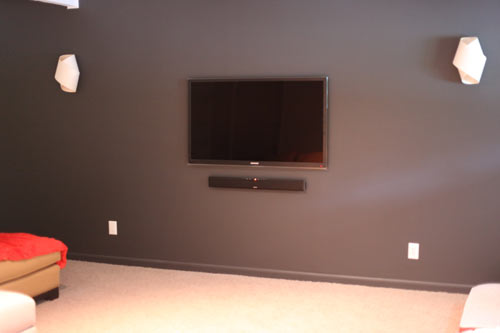
We also decided to accent the TV wall using a deep charcoal. By choosing a dark color, we created a theater-like experience in which the picture practically pops off the wall. We used dimmers in the room as well so that we can better control the lighting.
My husband is a wire-phobe. That’s the bona fide medical term for someone who hates to see exposed cords, wires, and other components, so he was adamant about floating the TV and soundbar on the wall and hiding all of the components (cable box, modem, Blue-ray player). Since the TV is mounted on a wall that adjoins the garage, he was able to move all of the components into the garage and use the smart remote RF functionality to operate them through the wall. I know – it’s like the future or something.

I have to say that the minimalist in me loves this setup.

The smart remote is just as cool. We’ve programmed it so that you hit one button and it turns on the TV, soundbar, and Blue-ray player and starts playing the disc. Now if only I could program it to feed and walk the dogs – maybe that’ll be a feature in the next generation of smart tech? You never know…
One of the reasons we bought this particular kind of TV was because it was Internet capable. While we hardwired the TV directly to our modem via a LAN cable, it also has WiFi capability. The Internet connectivity was essential so that we could stream TV shows from Netflix, surf the web, and do other Internet stuff without having to go grab the laptop. We’re pretty addicted to Breaking Bad and Dexter right now, and we’re trying to catch up on Mad Men. It’s so convenient – we don’t have to run out to the store or wait for a DVD to arrive in the mail.

The TV also comes with Yahoo widgets so we can update Facebook or Twitter from the TV while we’re still watching a program. Jordan can also get ESPN game updates without interfering with our program. We can download games without needing a gaming system. I can listen to Pandora while working, or check my Google calendar. Getting work done from my cozy couch is where it’s at, y’all. If this room had a refrigerator, I’d never leave.

Since we’ve only been playing around with it for a few months, we still haven’t explored all of the possibilities. I think there is a way to hook up my computer up to it and use it as a giant monitor, but I haven’t tried that yet. I even hear some smart TVs have a video camera so that you can Skype – I kind of wish ours had one of those…
Overall, we’re really pleased with our selection and now that the room is finally coming together just as we’re adding another member to our family, we can’t wait to spend even more time enjoying it together.
What does your Smart TV setup look like? Share an image in the comments or on Twitter using hashtag #IntelEMP.
 This article is part of the Technology and Design series, brought to you by Intel®, creating a better future with next-generation technology. Read all of the Technology and Design articles here.